Compare two spreadsheets.
- Formats accepted
- 19
- Stages
- 3
- Analysis behind it
- the full one
No account needed to start. You only pay when you like what you see.
- .xlsx. Excel workbook. Every sheet read, including the ones that are notes rather than data.
- .xls. Excel 97–2003. Read the same as a modern workbook.
- .xlsm. Excel, macro-enabled. Values and formulas are read. Macros are never executed.
- .ods. OpenDocument spreadsheet. LibreOffice and OpenOffice workbooks, read like Excel.
- .numbers. Apple Numbers. Tables are pulled out of the Numbers package sheet by sheet.
- .csv. CSV. Delimiter, quoting and encoding detected rather than assumed.
- .tsv. Tab-separated. Read as delimited text.
- .pdf. PDF. Checked for a text layer first. A PDF written by software keeps its table structure; a scan is read as an image and told apart from the first kind.
- .docx. Word document. Tables are lifted out of the document; the prose around them is kept as context.
- .pptx. PowerPoint deck. Tables and the data behind native charts are read slide by slide.
- .rtf. Rich text. Tables extracted, formatting discarded.
- .pbix. Power BI report. The tables inside the report are read out of its model, along with the measures that were defined on top of them, so your own definitions are used rather than re-invented.
- .pbit. Power BI template. A template carries the model and the measures without the data, and is read for both.
- .twbx. Tableau packaged workbook. The packaged extract is read as data, and the workbook beside it supplies the calculated fields.
- .twb. Tableau workbook. Calculated fields and the shape of each sheet are read.
- .hyper. Tableau extract. Read straight through, table by table.
- .txt. Plain text. Read as notes, or as data when the contents turn out to be a table.
- .md. Markdown. Markdown tables become tables; the rest becomes context for the analysis.
- .zip. Zip archive. Unpacked, and each file inside is treated as though you had uploaded it yourself.
What comes back
A finished project, rendered by the components that render your own.
The total barely moved, and almost everything underneath it did.
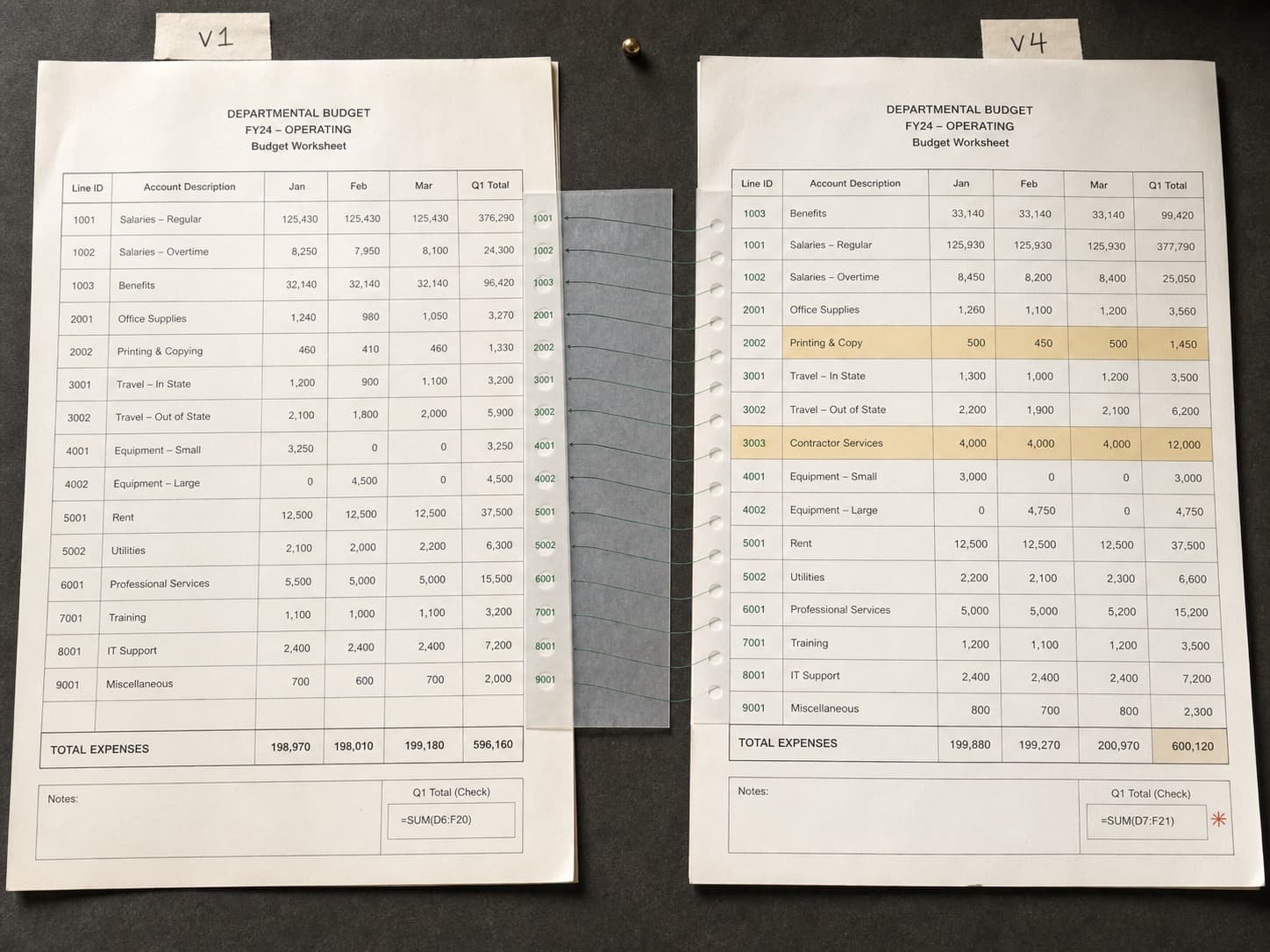
Between v1 and v4 the annual total moved by $4,000, less than 0.1%, which reads as a quiet revision. Underneath, contractor spend rose $412,000 and headcount spend fell $448,000, two changes an order of magnitude larger than the net, moving in opposite directions. A third change is a single edited rate that silently moved fifty dependent cells.
Two large changes, cancelling out
Net −$4,000 across changes totalling $974,000
- 01Contractor spend rose $412,000 while headcount spend fell $448,000.
- 02One edited rate silently changed fifty cells.
- 03A renamed column would have hidden 41 of the 63 changes.
It matches rows before it compares them
Files get re-sorted and rows get inserted. A positional diff on a re-sorted sheet reports almost everything as changed, which is the same as reporting nothing. Rows are matched on a key first: an id if there is one, or a content signature if there is not.
It notices the column you renamed
A renamed column looks like one deletion and one addition, and every value change inside it disappears. Columns are matched on position and content as well as header, so a rename stays a rename.
It follows formulas to what they touched
One edited assumption can move fifty cells that each show no change of their own. Changes are traced through the cells that depend on them, so the effect is reported where it landed rather than only where it was typed.
It expects a mess.
Most files that arrive here have several tables on one sheet, a title block above the data, totals stranded in the middle of it, and dates in more than one format. That is the normal case, not the awkward one.
- Every change, grouped by whether it is structural or a value
- Net effect on each total, with offsetting movements separated
- Change log as a .xlsx you can circulate
- Methodology, including how rows were matched
| Order | Date | Customer | Amt |
|---|---|---|---|
| 10241 | 07/02/26 | John Smith | $84.00 |
| 10242 | 2 July 2026 | SARAH LOPEZ | $41.00 |
| 10242 | 2 July 2026 | SARAH LOPEZ | $41.00 |
| 10243 | 45840 | s. lopez | 41 |
| Not supplied | Not supplied | SUBTOTAL | $166.00 |
| 10244 | 2026-07-03 | Amara Osei | $127.50 |
Questions it works through
Run against every dimension, not the three you had time for.
- What actually changed between these two versions?
- The total looks the same: is anything moving underneath it?
- Which of these changes were deliberate and which are formatting?
- Did anyone edit a formula rather than a number?
Questions people ask
Before anybody has uploaded anything.
My file was re-sorted between versions. Does that break it?
No, and this is the main reason a spreadsheet diff is not enough. Rows are matched on identity rather than position. In the worked example a positional comparison reports 198 changed rows; matching on the line id reports the 63 that actually changed.
What if a column was renamed?
It is detected as a rename rather than a delete-and-add, so the value changes inside it survive. The example includes one: 41 of its 63 changes would otherwise have been invisible.
Can it compare more than two versions?
Yes. Upload the whole sequence and you get when each change first appeared, which is usually the more useful question: four revisions apart tells you what changed but not when, or by which revision.
Does it handle formulas, or just values?
Both. A changed formula is reported as a change in its own right, and the cells that depend on it are traced so you can see what it moved. An edited rate that shifts fifty downstream cells shows up as one cause and fifty effects.
Keep going
The neighbouring jobs, and what happens to each file type this takes.
Upload both files
No account needed to start. You only pay when you like what you see.