Clean a messy spreadsheet.
- Formats accepted
- 16
- Stages
- 3
- Analysis behind it
- the full one
No account needed to start. You only pay when you like what you see.
- .xlsx. Excel workbook. Every sheet read, including the ones that are notes rather than data.
- .xls. Excel 97–2003. Read the same as a modern workbook.
- .xlsm. Excel, macro-enabled. Values and formulas are read. Macros are never executed.
- .ods. OpenDocument spreadsheet. LibreOffice and OpenOffice workbooks, read like Excel.
- .numbers. Apple Numbers. Tables are pulled out of the Numbers package sheet by sheet.
- .csv. CSV. Delimiter, quoting and encoding detected rather than assumed.
- .tsv. Tab-separated. Read as delimited text.
- .json. JSON. Nested objects are flattened into tables, keeping the path as the column name.
- .ndjson. Newline-delimited JSON. Streamed a record at a time, so an export of any size is fine.
- .xml. XML. Repeated elements become rows; attributes become columns.
- .parquet. Parquet. Read columnwise, with the file's own types kept.
- .sqlite. SQLite database. Every table read, with the foreign keys used to work out how they relate.
- .db. SQLite database. Read as SQLite when the file is one, and reported plainly when it is not.
- .txt. Plain text. Read as notes, or as data when the contents turn out to be a table.
- .md. Markdown. Markdown tables become tables; the rest becomes context for the analysis.
- .zip. Zip archive. Unpacked, and each file inside is treated as though you had uploaded it yourself.
What comes back
A finished project, rendered by the components that render your own.
Revenue is growing, but your growth is becoming less durable.
Revenue increased 23% over the period. Almost all of that growth came from a single product, while the share of customers who buy more than once fell from 31% to 24%. The business is getting bigger and less repeatable at the same time.
Revenue over time
- 01Product A produced 68% of total growth.
- 02Repeat purchase rate fell from 31% to 24%.
- 03Product F's refund rate is 2.8× the portfolio average.
It finds the problems worth fixing
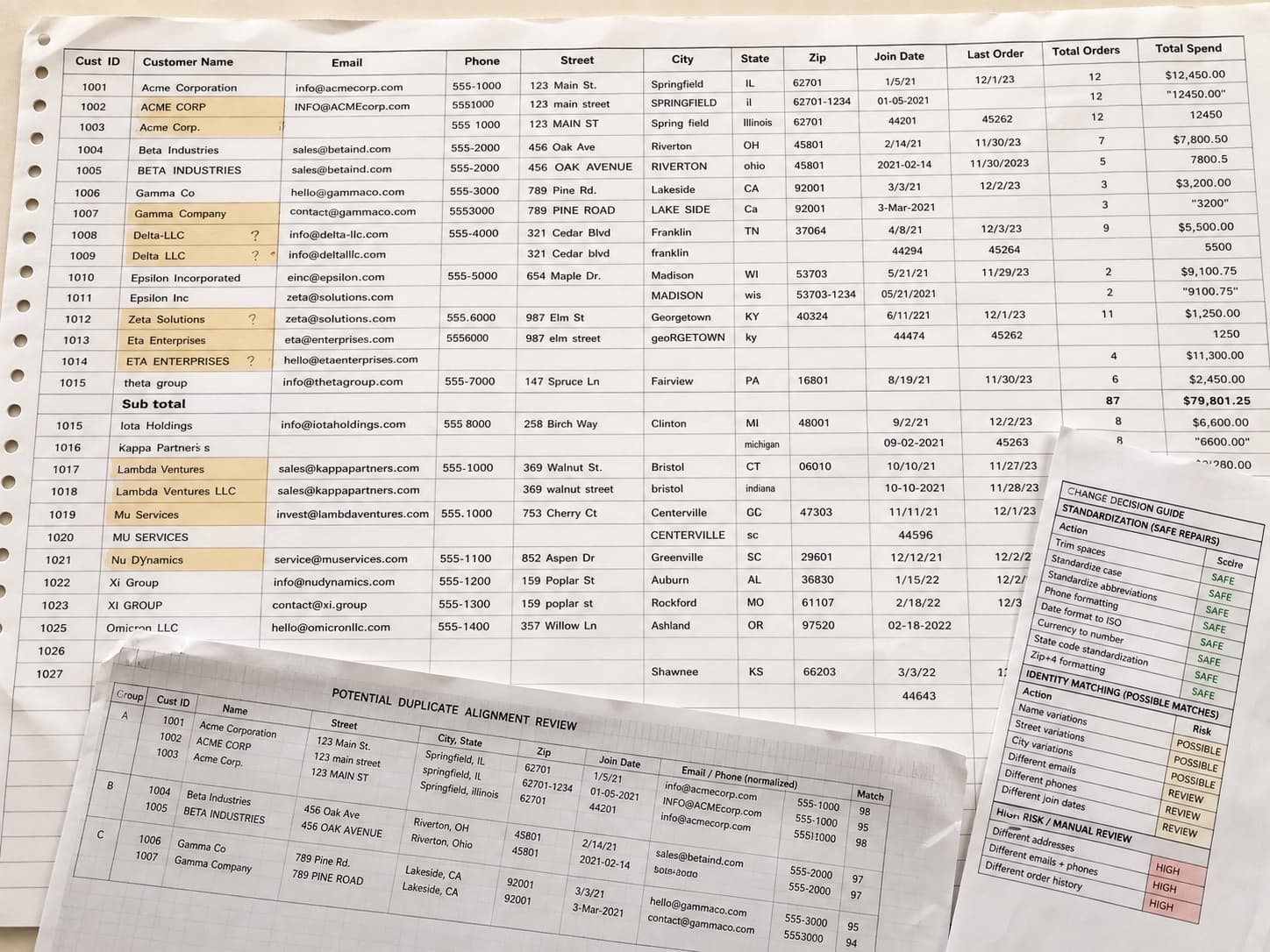
Not every inconsistency matters. Data Analysis App separates the ones that would distort an analysis from the ones that are merely untidy, and tells you which is which.
It repairs a copy, never your file
The file you uploaded is not modified. Repairs are applied to a new copy, and every one is reversible.
It asks before it guesses
Standardising “N.Y.” to “New York” is safe. Merging “Jon Smith” with “Johnathan Smith” is not. That one is surfaced as a decision with the evidence attached rather than done quietly.
It expects a mess.
Most files that arrive here have several tables on one sheet, a title block above the data, totals stranded in the middle of it, and dates in more than one format. That is the normal case, not the awkward one.
- Repaired .xlsx
- Change log
- Original, untouched
- Data quality summary
| Order | Date | Customer | Amt |
|---|---|---|---|
| 10241 | 07/02/26 | John Smith | $84.00 |
| 10242 | 2 July 2026 | SARAH LOPEZ | $41.00 |
| 10242 | 2 July 2026 | SARAH LOPEZ | $41.00 |
| 10243 | 45840 | s. lopez | 41 |
| Not supplied | Not supplied | SUBTOTAL | $166.00 |
| 10244 | 2026-07-03 | Amara Osei | $127.50 |
Questions it works through
Run against every dimension, not the three you had time for.
- How many rows are actually duplicates rather than genuine repeats?
- Which columns are silently mixing two different things?
- Are these blanks unknown, or zero?
- Which records look like the same customer entered twice?
Questions people ask
Before anybody has uploaded anything.
Will it change my original file?
Never. The upload is kept byte for byte as it arrived, and every repair is written into a new copy. Both are downloadable, and each individual change between the two is listed, so you can check the repairs rather than take them on trust.
How do I know what it changed?
Every repair is listed with a before and after, “New York City” becomes “New York”, grouped by the kind of problem, with a count for each.
What if it repairs something incorrectly?
Every change is reversible individually. Anything Data Analysis App was not confident about was not applied in the first place; it is waiting for you as a decision.
Can I reuse the same cleaning next month?
Yes. The rules it worked out are saved as a recipe, so next month's export takes minutes instead of starting over. If a column has been renamed, dropped or changed type since the last file, the recipe says so before it reports a single number.
Keep going
The neighbouring jobs, and what happens to each file type this takes.
Upload a messy file
No account needed to start. You only pay when you like what you see.