Analyze a bank statement.
- Formats accepted
- 24
- Stages
- 3
- Analysis behind it
- the full one
No account needed to start. You only pay when you like what you see.
- .xlsx. Excel workbook. Every sheet read, including the ones that are notes rather than data.
- .xls. Excel 97–2003. Read the same as a modern workbook.
- .xlsm. Excel, macro-enabled. Values and formulas are read. Macros are never executed.
- .ods. OpenDocument spreadsheet. LibreOffice and OpenOffice workbooks, read like Excel.
- .numbers. Apple Numbers. Tables are pulled out of the Numbers package sheet by sheet.
- .csv. CSV. Delimiter, quoting and encoding detected rather than assumed.
- .tsv. Tab-separated. Read as delimited text.
- .pdf. PDF. Checked for a text layer first. A PDF written by software keeps its table structure; a scan is read as an image and told apart from the first kind.
- .docx. Word document. Tables are lifted out of the document; the prose around them is kept as context.
- .pptx. PowerPoint deck. Tables and the data behind native charts are read slide by slide.
- .rtf. Rich text. Tables extracted, formatting discarded.
- .ofx. OFX statement. Transactions come with their own type codes and references, which makes matching far better than a CSV.
- .qfx. Quicken statement. Read as OFX, which is what it is underneath.
- .qbo. QuickBooks statement. Read as OFX, with the QuickBooks account mapping kept.
- .sta. MT940 statement. The SWIFT tags are parsed into transactions, balances and references.
- .png. PNG image. Screenshots of a dashboard or a table are read, and every figure is checked against the totals in the same image.
- .jpg. JPEG photo. A photograph of a printed report or a handwritten sheet is read into a table.
- .jpeg. JPEG photo. The same as .jpg.
- .heic. iPhone photo. Accepted as it comes off the phone. Safari usually hands it over as a JPEG.
- .webp. WebP image. Read like any other screenshot.
- .tiff. TIFF scan. Multi-page scans are read page by page.
- .txt. Plain text. Read as notes, or as data when the contents turn out to be a table.
- .md. Markdown. Markdown tables become tables; the rest becomes context for the analysis.
- .zip. Zip archive. Unpacked, and each file inside is treated as though you had uploaded it yourself.
What comes back
A finished project, rendered by the components that render your own.
You do not have a slow season. You have two clients who pay in 67 days.
Receipts fell 30% across November to January, which the business has been treating as a seasonal dip and planning around. Work invoiced over the same months fell 3%. The gap is collections: two clients on nominal 30-day terms paid at an average of 67 days, and every one of the 38 days the account spent overdrawn began between 30 and 45 days after an invoice to one of them.
The work did not stop. The money did.
- 01The winter dip is in the collections, not in the work.
- 02Two clients, 38% of revenue, account for every overdrawn day.
- 03$7,344 a year leaves for software that nothing uses.
It works out what each line is
A statement says `SQ *THE COFFEE HOUSE 04`, not “lunch”. Merchants are normalised before anything is grouped, and a payment is only called recurring once it has repeated over at least three cycles at a stable amount. An annual renewal is not read as a monthly one, and three visits to the same shop are not read as a subscription.
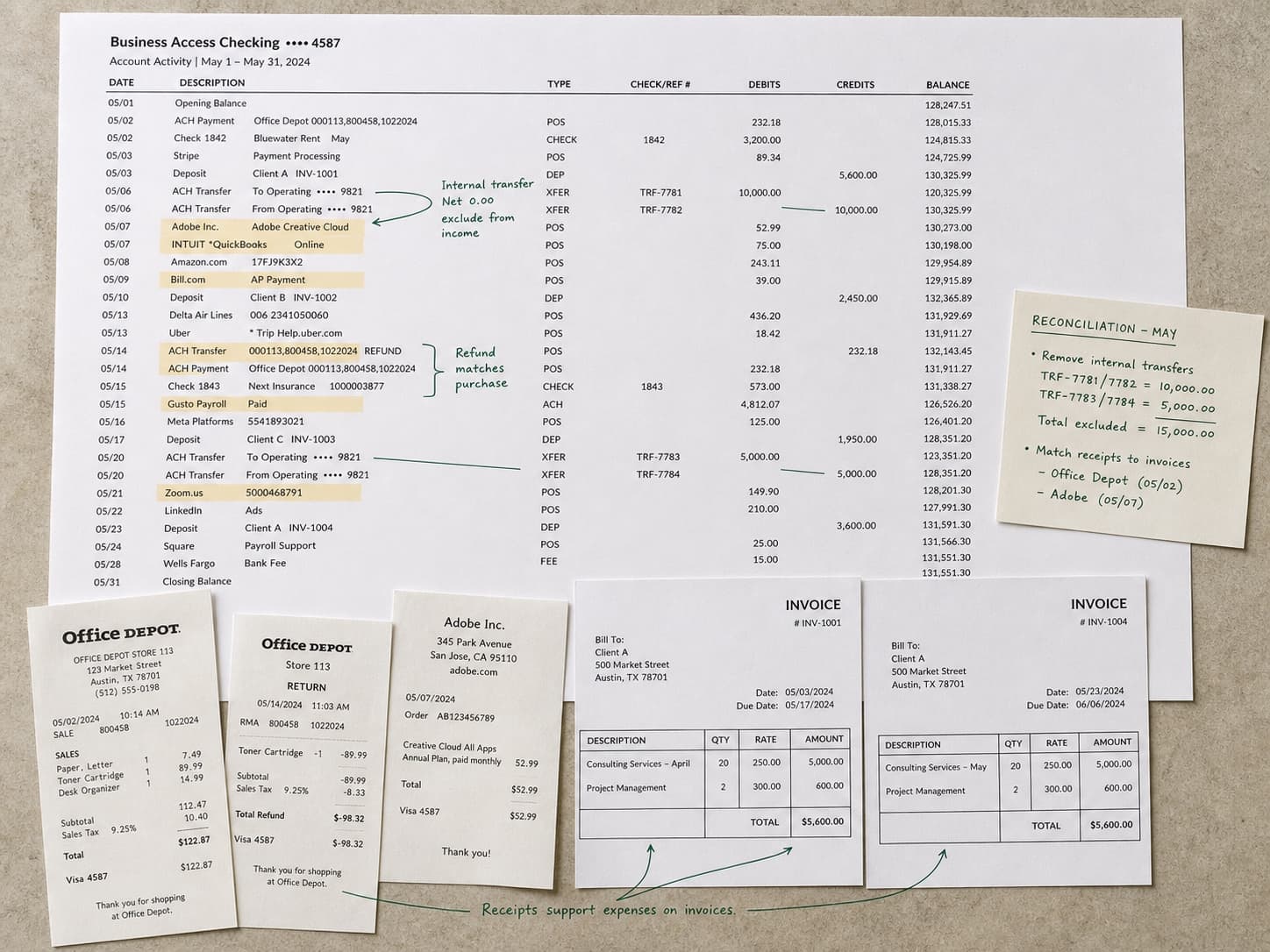
It keeps your own money out of your income
A credit matched to an equal debit from another account you own is a transfer, not revenue. Refunds are netted against the spending they reverse rather than counted as income, and a loan drawdown is separated from money you earned. In the worked example those rules are the difference between $486,200 of income and $548,600 of nonsense.
It reconciles the money to the invoices
Receipts are matched to invoices on reference and amount, with part-payments grouped back to the invoice they belong to. What could not be matched is named and counted rather than quietly absorbed. In the example, that is six receipts worth $9,100.
It expects a mess.
Most files that arrive here have several tables on one sheet, a title block above the data, totals stranded in the middle of it, and dates in more than one format. That is the normal case, not the awkward one.
- Every transaction classified, with the rule that classified it
- Recurring payments, including the ones nothing uses
- Invoice-to-payment reconciliation
- Cleaned .xlsx and the original, untouched
- Methodology, including every rule applied
| Order | Date | Customer | Amt |
|---|---|---|---|
| 10241 | 07/02/26 | John Smith | $84.00 |
| 10242 | 2 July 2026 | SARAH LOPEZ | $41.00 |
| 10242 | 2 July 2026 | SARAH LOPEZ | $41.00 |
| 10243 | 45840 | s. lopez | 41 |
| Not supplied | Not supplied | SUBTOTAL | $166.00 |
| 10244 | 2026-07-03 | Amara Osei | $127.50 |
Questions it works through
Run against every dimension, not the three you had time for.
- Where did the money actually go, in categories I would recognise?
- Which recurring payments am I still making for something I stopped using?
- How much of my “revenue” is money I moved between my own accounts?
- Which clients pay on time, and which ones only look like they do?
Questions people ask
Before anybody has uploaded anything.
Can it read a PDF statement?
Yes, and a CSV or OFX export is better. A PDF has already thrown away the payment reference field, which is what invoice matching runs on, so a PDF-only project reconciles less and says so. If your bank offers a data export, that is the file to use.
Will it confuse my personal and business spending?
It classifies, discloses and lets you reverse. The worked example flags 214 card transactions as personal, worth $8,900, as an assumption you can see and overturn: not as a silent deletion. Anything it is unsure about is surfaced as a decision rather than guessed.
Does it connect to my bank?
No, and it never asks for a login. It reads files you export yourself. There are no credentials to store and no ongoing access to revoke, and your files are deleted on the schedule you choose.
Is this bookkeeping software?
No. It will not file anything or talk to your accountant's system. It answers questions about a year of transactions that bookkeeping software records but does not ask, which of these payments are dead, whose payment behaviour is costing you, what the money did.
Keep going
The neighbouring jobs, and what happens to each file type this takes.
Upload statements
No account needed to start. You only pay when you like what you see.