Find out why people don't turn up.
- Formats accepted
- 14
- Stages
- 3
- Analysis behind it
- the full one
No account needed to start. You only pay when you like what you see.
- .xlsx. Excel workbook. Every sheet read, including the ones that are notes rather than data.
- .xls. Excel 97–2003. Read the same as a modern workbook.
- .xlsm. Excel, macro-enabled. Values and formulas are read. Macros are never executed.
- .ods. OpenDocument spreadsheet. LibreOffice and OpenOffice workbooks, read like Excel.
- .numbers. Apple Numbers. Tables are pulled out of the Numbers package sheet by sheet.
- .csv. CSV. Delimiter, quoting and encoding detected rather than assumed.
- .tsv. Tab-separated. Read as delimited text.
- .pdf. PDF. Checked for a text layer first. A PDF written by software keeps its table structure; a scan is read as an image and told apart from the first kind.
- .docx. Word document. Tables are lifted out of the document; the prose around them is kept as context.
- .pptx. PowerPoint deck. Tables and the data behind native charts are read slide by slide.
- .rtf. Rich text. Tables extracted, formatting discarded.
- .txt. Plain text. Read as notes, or as data when the contents turn out to be a table.
- .md. Markdown. Markdown tables become tables; the rest becomes context for the analysis.
- .zip. Zip archive. Unpacked, and each file inside is treated as though you had uploaded it yourself.
What comes back
A finished project, rendered by the components that render your own.
The no-show rate is not 22%, and what remains is caused by your own booking horizon.
The 22.4% figure the practice reports adds three unlike events together: appointments nobody attended, late cancellations whose slot was re-filled, and changes the clinic made itself. Separated, the unrecovered rate is 11.4%. Almost all of it sits in appointments booked more than a month ahead, which miss at 3.9 times the rate of appointments booked within a week, and the overbooking used to absorb missed appointments is what pushes routine bookings out that far.
How far ahead it was booked predicts whether anyone comes
3.9× the rate of an appointment booked this week
- 01The 22.4% rate adds three different events together.
- 02Appointments booked over a month ahead miss at 3.9 times the rate.
- 03Overbooking to cover no-shows is manufacturing the next ones.
It separates three things your system files together
“Did not attend” is written into the same status field as “cancelled late and we filled the slot” and “we moved it ourselves”. Those cost a session, a phone call and nothing respectively. Separated, the worked example's 22.4% becomes 11.4%. The smaller number is the one you can act on.
It tests the booking horizon before anything else
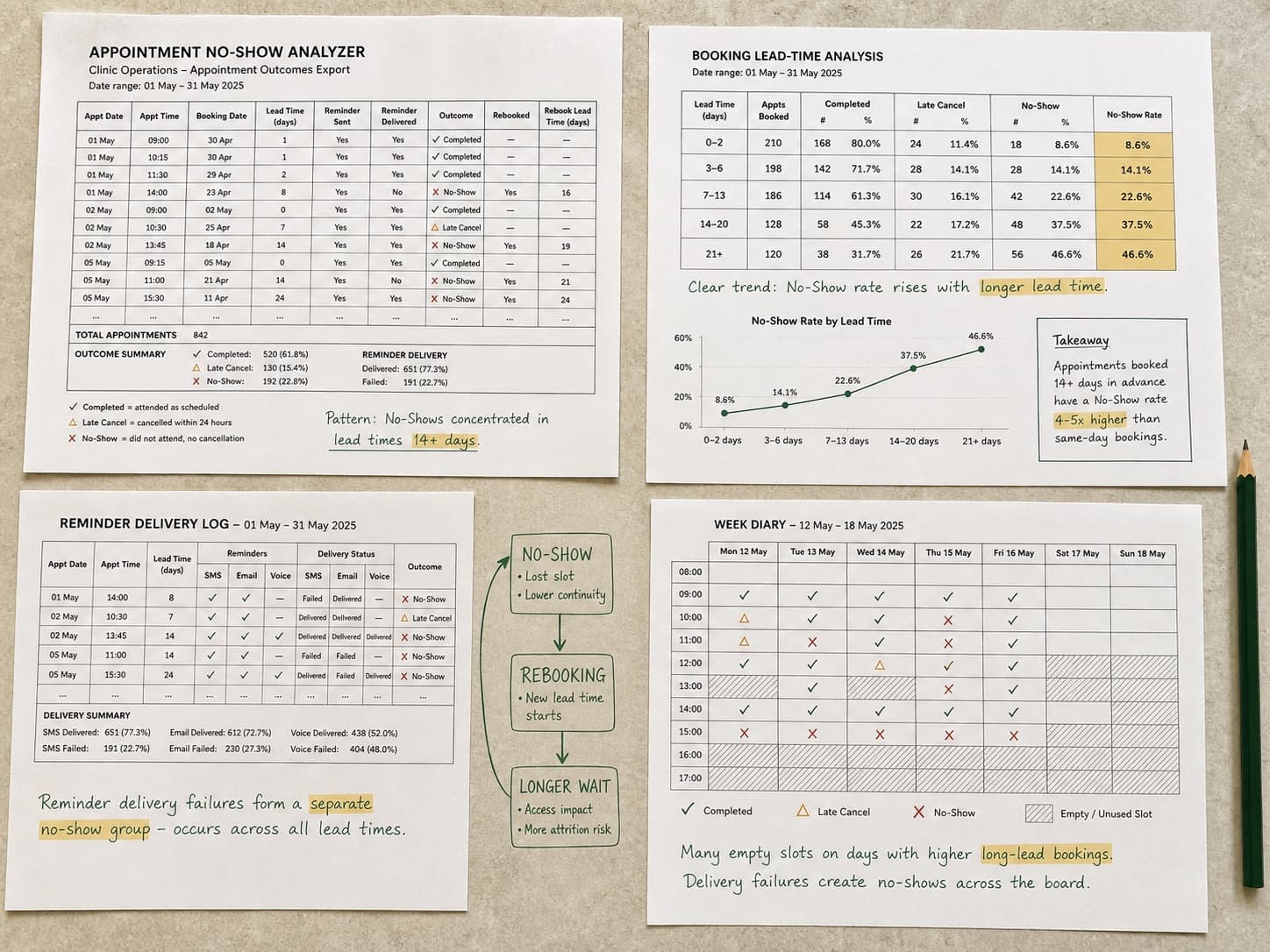
How far ahead an appointment was made is usually the strongest predictor in the file, and it is the one most exports bury. In the example, appointments booked over 60 days out are missed at 3.9 times the rate of those booked within a week, monotonically across every band, and it holds inside every clinician and every appointment type.
It looks for the loop, not just the cause
Overbooking to absorb missed appointments makes sessions run late; patients who waited over half an hour miss their next appointment at twice the rate, and the overbooking pushes routine appointments further out, which is the variable that started it. The example reports that as a loop, with the strength of each link and what is association rather than proof.
It expects a mess.
Most files that arrive here have several tables on one sheet, a title block above the data, totals stranded in the middle of it, and dates in more than one format. That is the normal case, not the awkward one.
- An unrecovered rate you can defend, with its definition
- No-show rate by lead time, session, clinician and appointment type
- Reminder effectiveness, by timing rather than in total
- The cost of the slots nobody filled
- Cleaned export and methodology
| Patient | Booked | Appt date | Status |
|---|---|---|---|
| P-04812 | 08/01/26 | 12/01/26 | Attended |
| P-04813 | 12 Jan 2026 | 14/01/2026 | Attended |
| P-04813 | 12 Jan 2026 | 14/01/2026 | Attended |
| P-04814 | 46074 | 2026-02-25 | no show |
| Not supplied | Not supplied | TOTAL NO-SHOWS | 312 |
| P-04815 | 2026-01-19 | 2026-01-23 | Attended |
Questions it works through
Run against every dimension, not the three you had time for.
- What is my no-show rate when it counts only one thing?
- How far ahead is too far ahead to let someone book?
- Are reminders working, or only reaching the people who would have come?
- Which sessions lose the most, and is it the same people every time?
Questions people ask
Before anybody has uploaded anything.
Is it safe to upload patient data?
Every figure is computed in code, not by a model, and columns that look like identifiers are masked before anything about your data is shown to a model, so no model needs to see who a patient is. Files are deleted on the schedule you set, and nothing is used to train anything.
Does this work for a salon rather than a clinic?
The file is the same shape and so is the problem. A booked slot, a lead time, an outcome and a staff member is all the analysis needs, whether it is a chair, a bay, a room or a tutor's hour.
Will it just tell me to send more reminders?
Only if the data says so, and in the worked example it does not: reminder timing is fixed at 48 hours regardless of whether the appointment was made yesterday or in March, and the booking horizon turns out to be the lever. A tool that recommends reminders before measuring them is guessing.
What if my export has no booking date?
Then the strongest finding is unavailable, and it will say so rather than substitute something weaker and call it the same. Attendance by session, by clinician and by type still works. Most booking systems can add the booking timestamp to an export: it is worth going back for.
Keep going
The neighbouring jobs, and what happens to each file type this takes.
Upload appointment export
No account needed to start. You only pay when you like what you see.