Why do Shopify sales differ from payouts?
Shopify sales reports describe sales activity under the selected report’s definitions, while payouts describe settlement of payment activity. Fees, refunds, payment providers, timing, and other adjustments can create legitimate differences. Reconcile by order and payment identifiers within each provider and currency instead of expecting calendar-day sales to equal bank deposits.
Key numbers
- $1,000
- synthetic gross payment activity
- $100
- example refunds
- $870
- net after $30 of fees
Key takeaways
- Read each report definition before comparing totals.
- Keep order, line-item, payment, and payout grains separate.
- Explain cash timing and deductions without relabeling payouts as profit.
Sales are up, but the bank deposit is smaller. Before looking for missing money, ask whether the two reports measure the same event. A sales report, payment export, and payout statement sit at different points in the order-to-cash process.
This method builds a bridge between those points. It uses invented amounts and manual exports; it does not assume that every Shopify payment runs through the same provider or arrives in one daily deposit.
Section 01
Write down the report definitions
Record the selected sales report, date range, filters, currency, and time zone. Check how that report treats discounts, returns, taxes, shipping, and order status. A metric named Total sales is not interchangeable with every other sales or payment total in the admin.
Shopify documents differences between sales reports and other exports. Keep the relevant definitions with your reconciliation rather than relying on remembered labels. A changed report filter can look like a performance change when the underlying store activity is unchanged.
Section 02
Separate four different grains
An order can contain several line items, more than one payment event, and a later refund. A payout can settle activity from many orders. Create separate tables or clearly named fields for order, line item, transaction, and payout identifiers.
A repeated order-level value on every line is a common source of inflated totals. For example, summing a $10 shipping charge repeated across three line items reports $30. Retain the lines for product analysis, but aggregate order-level fields once under an explicit rule before comparing them with payment records.
Section 03
Split the data by payment provider
Shopify Payments, an external gateway, manual payments, and other methods can have different settlement paths. A Shopify Payments payout should not be expected to equal sales collected through every provider. Identify the provider attached to each payment and keep currencies separate.
Where the source data cannot identify the provider or payment event reliably, label the affected amount as unresolved. Do not allocate missing records to the largest provider simply to make the control total reconcile. A visible exception is more useful than an unsupported match.
Section 04
Build a synthetic settlement bridge
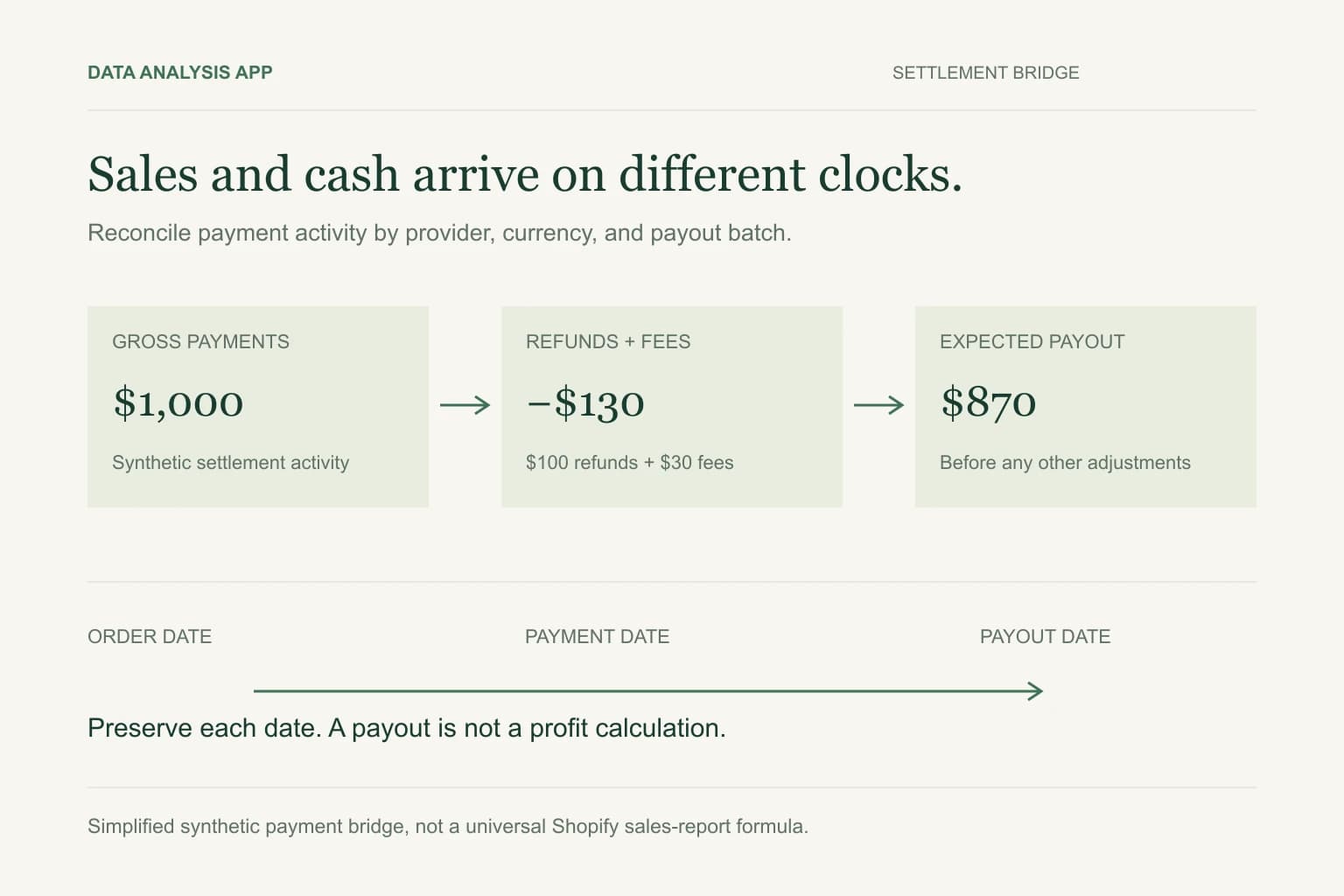
Assume one provider has $1,000 of gross payment activity in a settlement batch, $100 of refunds, and $30 of fees, with no other adjustments. The expected net is $870. The bank match then compares $870 with the deposit, not $1,000 with the deposit.
That bridge is a deliberately simplified payment example, not a universal Shopify sales formula. Actual reports may contain additional fields and adjustments. Check whether the exported amount is already net of a deduction before subtracting it again, and reconcile a known transaction from source to payout first.
Section 05
Handle returns and reporting dates
The order date, refund date, transaction date, and payout date may fall in different months. Preserve each one. A refund related to an earlier order can reduce a later settlement without representing a new negative order in the original sales period.
Check the date convention for the exact report being used. Comparing one period's sales to another period's settlement creates a timing difference that cannot be resolved by searching for a duplicate row. Keep the reporting cut-off explicit and revisit pending items after the next payout arrives.
Section 06
Reconcile cash before analyzing margin
Once payout activity matches the bank, a separate profitability analysis can bring in product costs, shipping expense, advertising, and other relevant costs. A deposit is cash received after certain settlement deductions; it is not net profit. Unrecorded supplier costs do not disappear because the payout reconciles.
The Shopify profitability example illustrates a separate decision workflow. Do not combine its contribution calculations with cash settlement without explaining the different definitions and source fields.
Section 07
Make the exceptions actionable
Keep an exception list with the relevant ID, currency, amount, owner, and next check. Separate unresolved mismatches from explained timing differences. Preserve the original downloads and a record of any normalization so another reviewer can reproduce the bridge.
For Data Analysis App, use an authorized export with unnecessary customer details removed. Start a project after preparing the grain and provider fields, and inspect the findings before buying report outputs. This is an export-based workflow: it does not promise automatic Shopify synchronization or substitute for a complete set of financial records.
See it on a real project
Product A produced 68% of total growth while repeat purchasing fell from 31% to 24%.
Keep reading
Evidence
Sources
- Shopify (2026). Shopify: sales discrepancies.
- Shopify (2026). Shopify: viewing payout details.
- Data Analysis App team (2026). Worked example: Shopify profitability.